
Game Overview
- Primary category: Action
- Best for: Browser, Chromebook, No Download
- Quality score: 92/100
- Platform: Browser, no download, Chromebook friendly
- Source host: Classroom6x Mirror
1. HOOK
A 9x9 grid sits in front of you, half-filled with wooden blocks, and three irregular shapes wait at the bottom of the screen. None of them fit cleanly. That single moment of arithmetic — where do these pieces go before they choke the board — is the entire game compressed into one decision.
2. WHAT IT IS
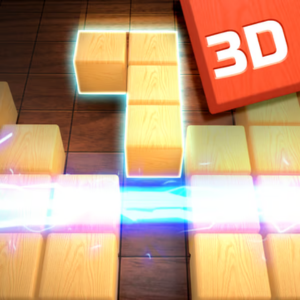
Wood Blocks 3D is a grid-placement puzzle rendered with wooden textures and soft lighting. You see a square board, usually 9x9, and a tray that offers three block shapes at a time. Each shape is a cluster of cubes, from single squares to L-bends and long bars.
Dragging a shape onto the grid locks it in place. Complete any full row or column and those blocks clear, freeing space. Loss happens when none of the three offered shapes can fit anywhere on the board. There's no timer forcing your hand, but the difficulty climbs as the grid fills and the shapes grow less forgiving over a long run.
3. HOW TO PLAY
Click and hold a shape, drag it onto the grid, release to place. Mouse handles everything. Keyboard input is minimal and mostly for menu navigation.
You must use all three shapes before a new set appears. That's the rule most people miss on the first run. They place two pieces fast, then realize the third one has nowhere to go, and the board jams. Clearing a row and a column at once is possible, and it doubles your cleared space in a single move.
The common beginner mistake is filling the center first. Edges and corners are harder to clear later. Build inward, not outward.
4. HOW IT DIFFERS
Tetris drops pieces from the top under gravity and a clock, demanding fast reflexes and rotation. Wood Blocks 3D removes both. Nothing falls, nothing rotates, and no clock ticks. You place shapes by hand in any order, which turns a reaction test into a spatial planning test. The pressure isn't speed; it's running out of legal moves.
That shift exposes the weakness. The loop can feel repetitive across long marathon sessions without breaks, because every round asks the same question with slightly worse odds. There's no narrative escalation, no new mechanic at level 50 that wasn't there at level 5. Once you've internalized the optimal placement logic, the game becomes a slow grind against probability rather than a fresh challenge.
5. WHO SHOULD SKIP IT
Anyone who needs forward momentum should walk away. If you measure a session by unlocks, new zones, or a story reason to keep going, this offers nothing. The board resets, the shapes return, and your only reward is a higher number than last time.
People who play to feel something other than mild concentration will find this hollow within twenty minutes. It's a calculator with a coat of varnish, and I mean that as a description, not an insult. Some folks want exactly that.
6. TIPS
- Reserve a column or row as a clearing lane. Keep one line nearly empty so you always have a place to slot a long bar. This prevents the board from locking when an awkward straight piece shows up.
- Place your largest shape first when a new set appears. Big clusters need open space, and that space shrinks with every move. Fitting the bar or square block early means the smaller pieces can squeeze around it afterward.
- Deliberately leave gaps near completed sections instead of cramming them shut. It feels wrong to waste room, but a single open cell in a near-full row lets you trigger a clear on demand. Tight packing leaves you no escape valve.
- Scan all three shapes before placing any of them. Decide the order in your head first. Many losses come from committing to piece one without checking whether pieces two and three still have homes.
7. COMPATIBILITY & ACCESS
The title runs directly in any modern browser without a download, so Chrome, Firefox, Edge, and Safari all load it the same way. As one of the more lightweight unblocked games around, it won't strain older hardware or eat through memory. Touch input works on phones and tablets, since the drag-and-drop mechanic translates cleanly to a finger swipe.
For locked-down environments, it tends to slip through. Schools that allow browser games for school Chromebook unblocked access will usually serve this without trouble, because it's hosted on standard web infrastructure rather than blocked app stores. Students hunting for the best unblocked games for school often land on grid puzzles like this precisely because they're quiet, low-bandwidth, and easy to close fast. No login or account is required to start a round.
8. FINAL TAKE
Wood Blocks 3D earns its place not by being remarkable but by being honest about what it is. Most browser puzzles dress up the same loop with fake progression bars and currency to disguise the repetition. This one doesn't pretend. You get a grid, three shapes, and the cold math of whether they fit, and that clarity is rarer than it sounds in a space crowded with manipulative design. I'd rather play something that respects my time enough to stay simple than another puzzle bolted to a gacha system. It knows what it is and stops there.
A clean, disposable timekiller that won't insult you.